Study Smarter

Tools that change how you study, in the order to climb them. Start free with the APUSH Study Plan at learningwithangie.com/apush-study-plan. Then: the Feynman Study System ($9) teaches the one method that makes anything stick; the Study Plan Coach ($9) is a Claude skill that turns your deadlines into a dated study plan and weekly schedule; the Study Skills System ($14) is the full toolkit across methods; the Study App Builder ($19) is the flagship – a Claude skill that interviews you on your own notes and builds your personal study app. The Exam Season Survival Kit is the seasonal add-on for finals week.

  • Study Plan Coach: A Claude Skill That Builds Your Study Schedule

    Finals in two weeks, three papers due, and a work schedule on top? Study Plan Coach turns all of it into a plan you can actually follow.

    It’s a Claude Skill: a small file you add to Claude once. After that you just say “make me a study plan” and Claude knows exactly how to build one. No prompts to copy. No blank planner to fill in.

    WHAT IT DOES
    – Builds a dated study plan from your exams, deadlines, topics and the time you really have
    – Tells you what to study, when, and how: active recall, practice questions, spaced review, not just “read chapter 4”
    – Makes a time-blocked weekly schedule or an exam countdown around classes, work and sleep
    – Puts the hard stuff in your best focus hours and saves buffer time for the week that goes sideways
    – Tells you plainly when it won’t all fit, and helps you pick what matters most
    – Rebuilds the plan after a missed day without piling everything onto tomorrow
    – Runs a quick check-in and answers “what should I study today?”

    THE 15-MINUTE VERSION
    Paste your syllabus or list your deadlines, answer a few questions, and you have a plan in about 15 minutes. Low energy? It gives you one small task you can finish in 10 to 25 minutes so you keep moving.

    WHAT IT WON’T DO
    It won’t write your essay or do your homework. It’s a coach, not a shortcut. It also won’t guarantee a grade or recommend all-nighters.

    FOR PARENTS
    Sit down together, enter the deadlines, and let your student drive. You get a plan you can both see without being the one who nags.

    HOW TO INSTALL (2 minutes)
    Do NOT unzip the file. In Claude (claude.ai or the desktop app) go to Settings > Capabilities > Skills, upload the zip and switch it on. You need a Claude account with code execution and file creation turned on. Full steps are in the README inside the zip.

    Instant download. Because you get the file right away, all sales are final. Trouble installing? Reach us through the contact page and we’ll help.

    You don’t need to have it all figured out. You just need the next step.
  • The Study App Builder — Claude Skill

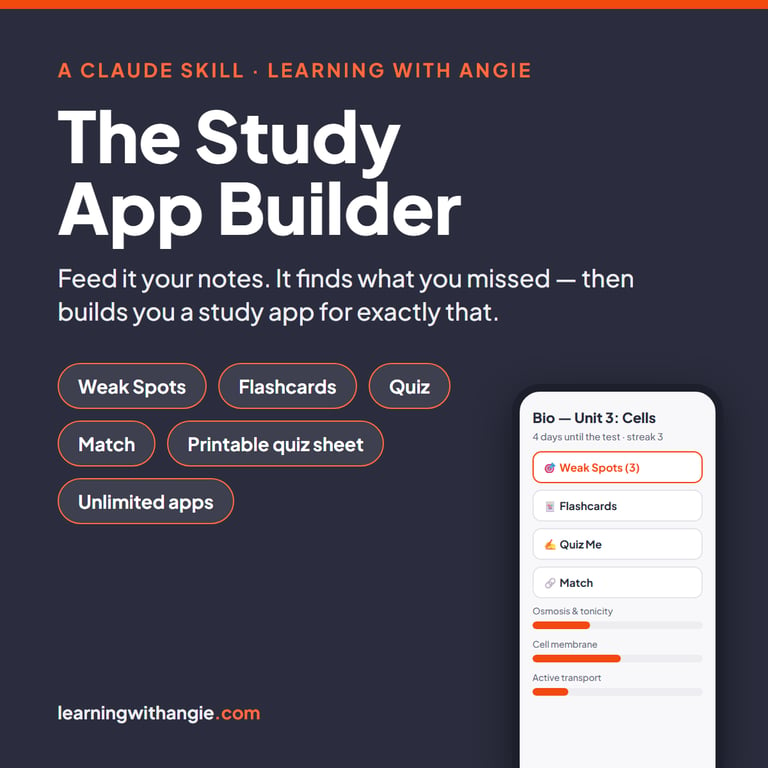
    Anyone can ask AI for flashcards. That’s not the hard part. The hard part is knowing what you DON’T know – and that’s exactly what this does.

    The Study App Builder is a Claude skill for students (middle school through college) and parents of middle schoolers. Install it once. From then on, upload any study material – class notes, slides, a review packet, photos of handwritten notes – and Claude:

    1. Interviews you first. What do YOU think matters on this test? Commit to your list.
    2. Shows you what you missed – with evidence from your own notes (“your teacher wrote KNOW THIS next to the pump”). You confirm or skip each one.
    3. Builds you a personal study app – one file that works on any phone or computer, offline, no account, progress saved on the device.

    Every app has five modes: Weak Spots (pre-loaded with the topics you missed in the interview), Flashcards that bring missed cards back around, a Quiz weighted toward your weak topics with every answer explained, Match games, and a printable Quiz Sheet with answer key so a parent can quiz out loud at the dinner table.

    Unlimited study apps – every test, every class, all year. Each app keeps working after finals.

    What you need: a Claude account on a paid plan (claude.ai Pro, the Claude desktop app, or Claude Code) – skills are a paid-plan feature. If you’re already paying for Claude, your subscription just became a tutor.

    Your download: the skill file plus a one-page install guide. Install takes about a minute.

    Parent of a middle schooler? Say so at the start and the skill switches to parent-led mode: it writes you a ten-minute Table Talk script to run with your student at the kitchen table, builds the app in their language, and hands you Parent Notes plus a printable quiz sheet for quizzing out loud. Now shipping as v2 – existing buyers re-download the zip from their account.

  • The Exam Season Survival Kit

    Exams aren’t hard. Ambushed exams are hard.

    You know the feeling — it’s Sunday night, there’s a test Thursday, and you have absolutely no idea whether you’re in trouble or fine. So you do the thing everybody does: you reread the chapter, feel vaguely productive, and find out Thursday morning that rereading was never studying.

    This is the fix. Not a study philosophy — a two-week plan that tells you what to do on which day, working backwards from the date on the calendar.

    What’s inside

    The 20-Minute Triage. Every exam you’ve got, rated honestly — Solid, Shaky, or Scared. Twenty minutes, and you finally know which one is actually going to hurt you.

    The 14-Day Backwards Plan. Two printable grids that count down from exam day, split into Learn Mode (days 14–8), Test Mode (days 7–2), and a Taper (day 1). You are never guessing what tonight is for.

    The Miss List. The single highest-leverage page in here. Every question you get wrong goes on it — and gets retested two days later, on purpose, because the stuff you missed is the only stuff worth your evening.

    When They Stack. What to do when three exams land in the same week and the plan collapses. It has a plan too.

    The Two Protocols. Day-before and day-of, as cut-out cards for your wallet or your laptop sleeve — plus a third card for the ten minutes right after, which is the part nobody tells you about.

    It comes as a printable AND an app — both included, one price.

    Print the grids and fill them in by hand if that’s how your brain works. Or open the app, put in your exam date, and watch the fourteen days build themselves backwards with the right mode on each one. Every miss you log schedules its own retest automatically. The countdown updates itself. It prints your filled-in plan when you want it on paper.

    Who this is for: high schoolers and college students with real exams on a real calendar. Also perfectly usable by a parent who wants to hand their kid a system instead of another lecture about studying earlier.

    GOOD TO KNOW
    Instant download: a printable PDF and a one-page sheet with your app link. Nothing ships.
    US Letter. Print at home or at any print shop.
    The app is included and opens in your phone’s browser.
    Personal use. Because it’s a digital product, all sales are final.

    QUICK QUESTIONS
    When do I get it? Right after checkout, on the confirmation page and in your receipt email.
    File won’t open? Email hello@learningwithangie.com and we’ll get you sorted.

  • The Study Skills System — Notion Template

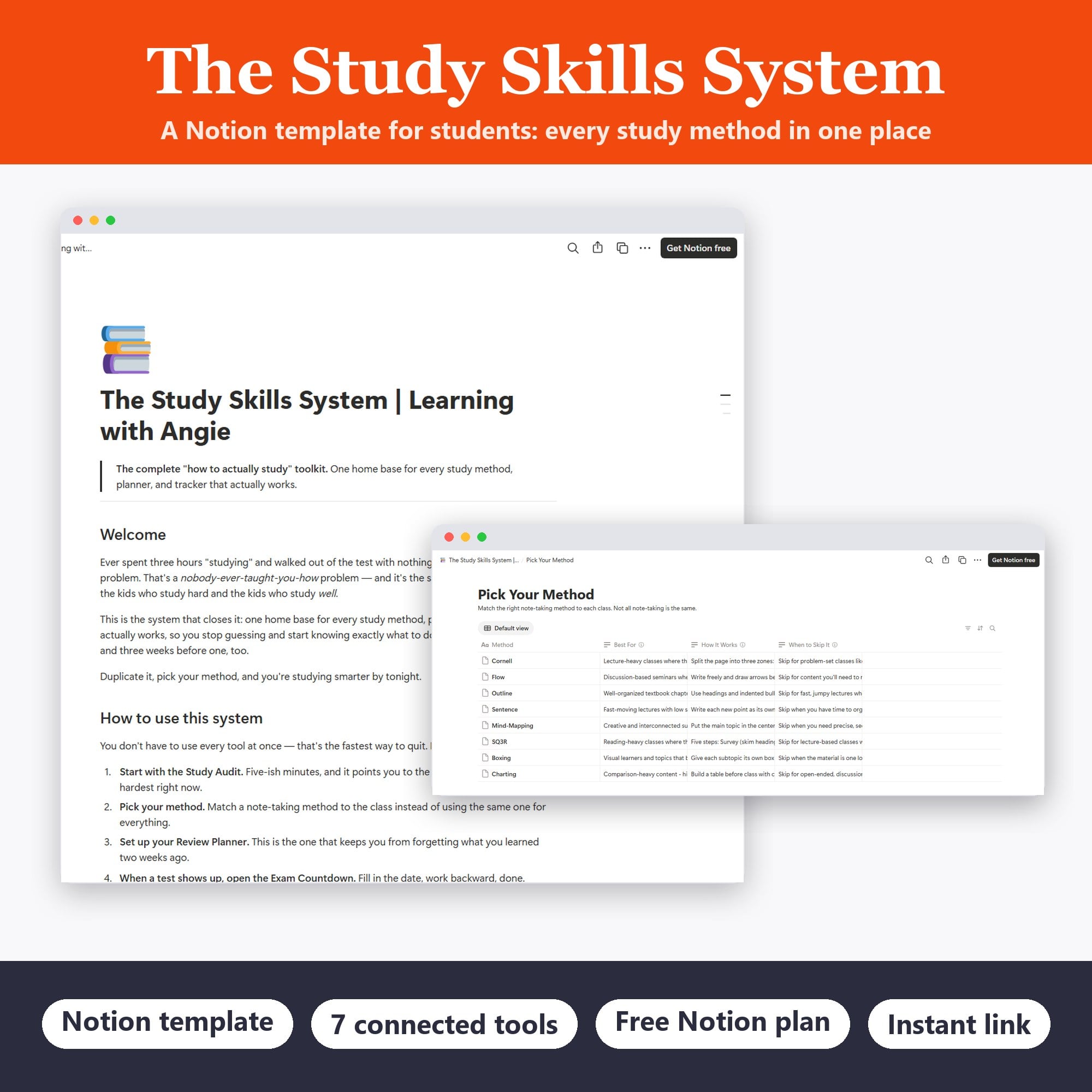
    Notion template · 7 connected tools · works on the free Notion plan · instant link to duplicate

    Ever spent three hours “studying” and walked out of the test with nothing?

    That’s not a you problem. That’s a nobody-ever-taught-you-how problem — and it’s the single biggest gap between the students who study hard and the students who study well.

    The Study Skills System closes it. One home base for every study method, planner, and tracker that actually works, so you know exactly what to do the night before a test — and three weeks before one, too.

    What’s inside

    The Study Audit — five-ish minutes of honest questions that point you to the two or three tools worth leaning on hardest right now. Start here.

    Pick Your Method (database) — match the right note-taking method to each class, instead of using the same one for everything and wondering why it only works sometimes.

    Spaced Repetition + Active Recall Planner (database) — review before you forget, not after. This is the one that keeps you from losing what you learned two weeks ago.

    Exam Countdown Study Schedule — fill in the test date, work backward, done. No more deciding what to study while you’re already panicking.

    Focus Session Tracker (database) — study in sessions short enough that your brain can actually hold them.

    Memorization Toolkit — for the stuff you don’t get to reason your way through and just have to know cold.

    Where to Go Next — the companion tools that go deeper, once you know which direction deeper means for you.

    How to use it

    You don’t have to use every tool at once — that’s the fastest way to quit. Take the Study Audit, pick your method, set up your Review Planner, and open the Exam Countdown when a test shows up. That’s it. Everything is a page or a database you can edit and rearrange, so make it yours.

    Who it’s for

    High school and college students who are putting in the hours and still feel behind — and anyone who’s realized that “study more” was never actually the advice they needed. Works in the free version of Notion.

    How you get it

    Instant delivery: you’ll get a link to duplicate the whole system straight into your own Notion workspace. Duplicate it, take the audit, and you’ll know what to do with tonight’s study block before you sit down.

    No cramming. No guessing. Just a system that tells you what to work on while there’s still time to do something about it.

  • The Feynman Study System — Notion Template

    Ever studied for hours and still blanked on the test? That’s not a memory problem — it’s a “rereading feels like studying but isn’t” problem. This template fixes it.

    The Feynman Technique is the method a Nobel Prize-winning physicist used to master anything: if you can explain a concept simply enough for a 12-year-old to get it, you actually understand it. If you can’t — congratulations, you just found exactly what to study next. Before the exam finds it for you.

    What’s inside this Notion template

    • The 4-Step Method guide — the whole technique, explained in plain words you’ll actually read (no lecture, promise)
    • My Feynman Concepts tracker — one organized home for every concept you’re learning, with subject, status, confidence, and review-date tracking so nothing slips
    • A fully worked example — a real concept taken through all four steps, so you see exactly what “done” looks like before you start
    • Exam Mode — a simple play for test week: turn your explanations into practice questions, answer them cold, and spend your remaining time only on what actually needs work
    • Built-in review dates — because rereading your own five-minute explanation beats rereading the textbook for an hour

    Who it’s for

    High school and college students taking on concept-heavy classes — biology, history, chemistry, econ, anything where “I sort of get it” isn’t going to cut it. Works in the free version of Notion.

    How you get it

    Instant delivery: you’ll receive a link to duplicate the template straight into your own Notion workspace. Duplicate it, add your first concept, and you’re studying smarter tonight.

    No cramming. No panic. Just a system that shows you what you know — and what you don’t — while there’s still time to do something about it.