The Ultimate Guide to Your Student ‘Second Brain’: Everything You Need to Succeed in Notion

Do you ever feel like your brain is a browser with 50 tabs open, and three of them are playing music you can’t find?
As a student, you’re constantly bombarded with information. Between lecture notes, assignment deadlines, extracurricular schedules, and those "I should really look into that" ideas, it’s no wonder we feel overwhelmed. Your brain is designed for having ideas, not for holding them.
That’s where the Second Brain comes in.
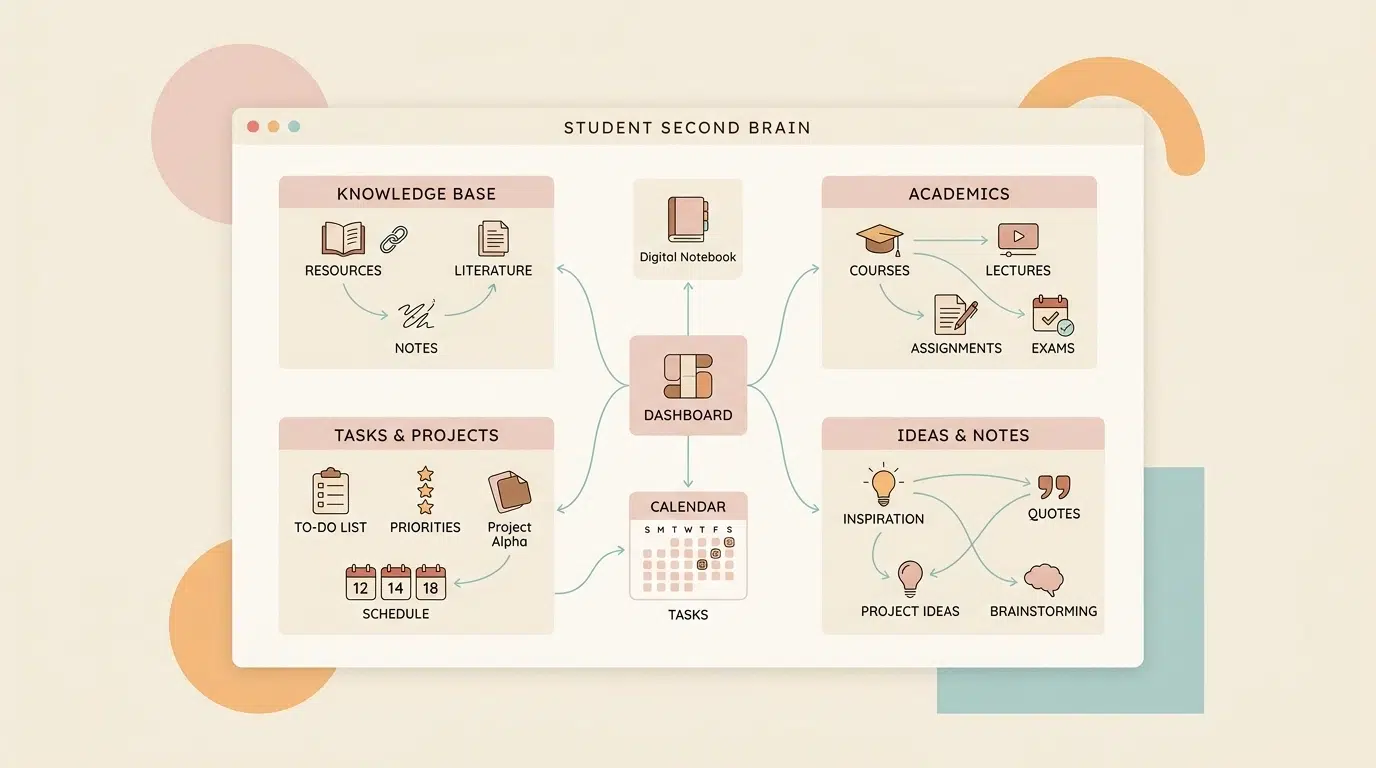
By building a digital system in Notion, you can offload the "remembering" part of your life and focus on the "doing" part. Ready to become the most organized version of yourself? Let’s dive into how you can build a student-focused Second Brain that actually works.
What Exactly Is a Second Brain?
A Second Brain is an external, digital system that allows you to capture, organize, and retrieve information whenever you need it. Think of it as a personal knowledge management system that grows with you throughout your academic career. Instead of losing a brilliant essay idea or forgetting a key study tip, you store it in a central hub.
To make this system effective, we use the PARA Method, popularized by productivity expert Tiago Forte. This method categorizes everything into four distinct buckets based on how actionable the information is.
Step 1: Build Your Command Center with Projects
Projects are the most active part of your Second Brain. These are short-term efforts with a specific goal and a deadline. For a student, a project isn't just "Biology class": it's "The Biology Lab Report due next Friday."
In Notion, you should create a Master Projects Database. Here’s how to make it effective:
- Set Clear Deadlines: Use the Date property to keep track of when projects need to be finished.
- Link Your Tasks: Every project should have a set of actionable steps. By linking a Task database to your Projects database, you can see exactly what needs to be done for each specific goal.
- Status Tags: Use tags like "Not Started," "In Progress," and "Complete" to see your progress at a glance.
If you’re feeling overwhelmed by the college application process specifically, check out our Notion College Search Template to see how a project-focused database can streamline your future.

Step 2: Organize Your Life via Areas
While Projects have an end date, Areas are ongoing parts of your life that require a standard of performance. Think of these as the categories that define who you are as a student and a person.
Essential Areas for students include:
- Academics: Your different subjects (Math, English, History).
- Finances: Managing your student budget or money management for students.
- Health & Wellness: Sleep tracking, gym routines, and stress reduction techniques.
- Personal Growth: Hobby discovery or skills you're learning outside of school.
In Notion, create a page for each Area. This becomes your "home base" for that topic. For example, your "Academics" page might contain links to your syllabus, your note-taking templates, and a calendar of your classes.
Step 3: Store Knowledge in Resources
This is where the magic of "learning" really happens. Resources are your library of interests. If you find a great article on essay structure or a cool infographic on color psychology, it goes here.
A Resource doesn't have a deadline, and it isn't necessarily an "area" you're maintaining. It's simply information you find interesting or useful for the future.
- Use the Notion Web Clipper: This is a game-changer. Whenever you find a helpful website, you can "clip" it directly into your Notion Resources database.
- Tag by Topic: Use tags like "Writing Tips," "Scientific Research," or "Personal Interests" to make searching easy later.
- Distill the Content: Don’t just save the link! Write a two-sentence summary of why you saved it. This makes it 10x more useful when you revisit it six months later.
Step 4: The Archive for Everything Else
The Archive is the "storage unit" of your Second Brain. When a project is finished (like last semester's Finals) or an Area is no longer relevant, move it to the Archive.
The goal is to keep your main workspace clean and focused only on what is currently active. Nothing is ever truly deleted, so you never have to worry about losing your old academic writing tips or research papers: they’re just tucked away out of sight.

Mastering the Workflow: Capture, Organize, Distill
Setting up the databases is only half the battle. To make your Second Brain successful, you need a workflow that you can stick to.
1. The Quick Capture
Friction is the enemy of productivity. If it takes you five minutes to find the right page to write down an idea, you won’t do it. Create a "Quick Capture" button on your Notion mobile app or your desktop dashboard. This allows you to dump ideas instantly and sort them into the PARA categories later.
2. The Weekly Review
Set aside 20 minutes every Sunday to "clean up" your Second Brain. Move items from your Quick Capture into the right Projects or Areas. Update your deadlines and check off completed tasks. This ensures your system stays organized and doesn't become a digital junk drawer.
3. Connect the Dots
The true power of Notion is Relations. Link your Resource notes to your active Projects. For example, if you’re writing an essay on climate change (a Project), you should be able to instantly pull up all the research papers you saved in your Resources database.
Why Students Need This System Now
Building a Second Brain isn't just about getting better grades; it's about reclaiming your mental energy.
- Reduce Stress: When you know every deadline and note is safely stored in Notion, that constant "am I forgetting something?" anxiety disappears.
- Enhance Creativity: By having all your research and ideas in one place, you can see connections between different subjects that you might have missed before.
- Better Learning: The act of organizing and distilling information helps it stick in your "first" brain much better.
Ready to Start Your Notion Journey?
Building a system from scratch can feel daunting, but you don't have to do it alone. Whether you're a high school student preparing for the next step or a college student looking to streamline your workflow, Notion is the ultimate tool to help you succeed.
Start small. Create one database for your current classes and see how it feels to have everything in one place. Once you see the benefits, you'll never want to go back to paper scraps and scattered files again.
Join The Community!
Looking for more actionable resources to enhance your student life? Sign up for our biweekly updates to get study hacks, Notion tips, and success strategies delivered straight to your inbox. Let’s make learning easier, together.

Want a head start? The All-in-One Student Notion Dashboard 2.0 in my shop was made for exactly this — it’ll save you a ton of time.