The Ultimate Guide to Your College Application Dashboard: Everything You Need to Succeed in Notion
Are you feeling buried under a mountain of application deadlines, essay prompts, and financial aid forms?
The college application season is famously one of the most stressful times in a student’s life. Between maintaining your GPA, participating in extracurriculars, and trying to figure out which schools actually fit your vibe, it’s easy for things to slip through the cracks. But what if you could trade that scattered stack of sticky notes for a streamlined, all-in-one digital command center?
Enter the Notion College Application Dashboard.
By centralizing every piece of the puzzle in one place, you can move from a state of constant panic to total preparation. In this guide, we’ll show you exactly how to build a dashboard that keeps you organized, focused, and ready to hit "submit" with confidence.
Centralize Your Chaos: Why a Notion Dashboard is a Game-Changer
When you’re applying to five, ten, or even fifteen schools, your brain isn't meant to store all those different portals and deadlines. A dedicated Notion dashboard acts as your second brain, ensuring that your energy goes into writing a killer personal statement rather than searching for your login credentials.
- Ultimate Visibility: You can see your entire application season at a glance, from early action deadlines to final decision dates.
- Reduced Stress: Knowing exactly what is finished and what is left to do eliminates that nagging feeling that you’ve forgotten something essential.
- Streamlined Collaboration: Many students share their dashboard with parents or mentors, making it easy to get feedback on essays or updates on financial aid.
- Mobile Access: Whether you’re on the bus or in the library, your entire plan is available on your phone via the Notion app.
Ready to become the most organized version of yourself? Let’s dive into the core components every successful dashboard needs.

The Core Components of Your Application Command Center
To create a dashboard that truly works for you, you need more than just a list of names. You need a functional system that prioritizes action. We recommend building your dashboard around these three essential pillars:
1. The College Master Hub
This is the heart of your workspace. It’s a database where you list every school you are considering. To make this effective, you should include properties like:
- Application Type: ED (Early Decision), EA (Early Action), or RD (Regular Decision).
- Status: Use a status bar to track if you are Researching, In Progress, Submitted, or Accepted.
- Vibe Check: A 1-5 star rating based on how well the school fits your personal goals and lifestyle.
- Reach/Match/Safety: A clear label to help you balance your application strategy.
2. The Essay Vault
The average student writes dozens of essays during application season. Without a system, you’ll find yourself digging through Google Docs trying to remember which version of your "Why This Major" essay you sent to which school.
- Prompt Tracker: Copy the exact prompt into your dashboard so you never have to navigate back to the portal to check it.
- Word Count Tracker: Set a target and track your progress to stay within those strict limits.
- Status Labels: Use tags like Drafting, Editing, and Finalized to stay on schedule.
3. The Deadline & Task Manager
This isn’t just a calendar: it’s an actionable list of small wins. Break down each application into tiny, manageable steps. Instead of "Apply to UCLA," your dashboard should show "Request Transcript," "Ask for Recommendation Letter," and "Review Personal Statement."
Step-by-Step: Setting Up Your Workspace for Efficiency
Ready to build? Setting up your Notion space doesn't have to be complicated. If you've already mastered smart organization tips for students, you know that the best systems are the ones you actually use.
Step 1: Create Your Master Database
Open a new page in Notion and type /table. Label it "College Search." Add columns for your school names, deadlines, and application status. This gives you a high-level view of your entire journey.
Step 2: Build a Kanban Board
Switch your database view to a "Board." Group it by "Status." This allows you to visually move a school from "Researching" to "Submitted" as you progress. There is no feeling quite like dragging a "Reach" school into the "Submitted" column!
Step 3: Integrate Your Timeline
Using a "Timeline" view in Notion is the best way to see how your tasks overlap. You’ll quickly notice if you have three major essays due in the same week, allowing you to manage your study time better and start earlier on those high-priority items.

Expert Tips to Streamline Your Workflow
Once your basic dashboard is built, you can enhance it with a few "pro" moves that will save you hours of frustration down the line.
- Use the Web Clipper: Install the Notion Web Clipper on your browser. When you find a helpful article about a school or a great scholarship opportunity, clip it directly into your dashboard with one click.
- Create Template Buttons: Inside your "College Master Hub," create a page template that includes a checklist for every school. When you add a new university, one click will generate a fresh to-do list, an essay space, and a research section.
- Centralize Your Financial Aid: Don’t let money matters get lost. Create a sub-page for Scholarships and Financial Aid. Track your FAFSA status, CSS Profile requirements, and specific scholarship deadlines for each institution.
For those of you helping your kids through this, check out our 7-step ultimate college prep checklist for parents for a broader perspective on the whole process.
Why Aesthetic Organization Actually Matters
You might think that making your dashboard look "pretty" is a waste of time, but we believe that an aesthetic workspace is a more effective one. When your dashboard is clean, organized, and visually appealing, you are more likely to return to it and use it daily.
- Use Icons and Covers: Assign a unique icon to each school or section to help your brain process information faster.
- Color-Code Everything: Use colors to distinguish between "High Priority" and "Optional" tasks.
- Add Motivation: Embed a playlist or a few "Letting Go" affirmations to help reduce stress during the more intense weeks of the season.
If you love the look of a well-organized digital space, you might also want to learn how to take aesthetic notes to keep your classwork looking as sharp as your application dashboard.

Join The Community for More Success Tools
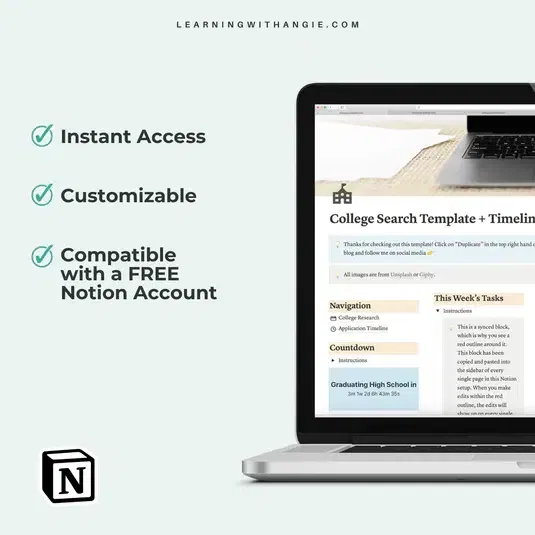
Building a dashboard from scratch can be a lot of work. If you’d rather spend your time focusing on your essays than your Notion formulas, we’ve got you covered. Our Notion College Search Template + Timeline is designed to give you an immediate head start. It’s fully customizable, works with free Notion accounts, and includes everything we’ve discussed in this guide.
[CENTRALIZED COMMAND]
Want a simpler way to keep every school, task, and deadline in one spot? The One-Page Application Master-Hub ($14) gives you a clean, easy system to organize your college applications without overcomplicating your workflow. If you want one place to track everything and stay focused, this is a smart place to start.
Organize Your Applications Now
Whether you build your own or use our tested template, the most important step is to start today. The earlier you organize your information, the easier your senior year will be.
Ready to take control of your future? Join our community by signing up for our biweekly newsletter. We send out the latest study hacks, productivity tools, and student success resources directly to your inbox. You don’t have to do this alone: let’s get organized together!